
Is Microsoft Copilot Worth It? A Cost-Benefit Breakdown for Businesses
Microsoft 365 Copilot delivers measurable productivity gains for organizations that heavily utilize Microsoft’s ecosystem, provided they assign licenses strategically and manage data governance. This guide breaks down the current licensing costs, application-specific features, independent return on investment evidence, and the practical steps required to evaluate whether the tool justifies its price for your specific workforce.
What Are the Current Licensing Requirements and Pricing?
Microsoft 365 Copilot operates as a paid add-on license priced at $30 per user per month, requiring an existing qualifying base subscription like Business Standard or Enterprise E3. Small and mid-sized businesses can buy a cheaper Copilot Business add-on, while Copilot Chat comes at no extra cost with eligible work accounts.
The full Copilot experience requires a qualifying base license, meaning you cannot purchase it as a standalone product for your tenant. Microsoft also includes Copilot Chat at no extra cost with eligible Microsoft 365 work accounts. It works in the Copilot app, Edge, Outlook and Teams, but answers from web data and can’t search your organization’s files through Microsoft Graph; it only uses work content you upload or have open in Outlook and Teams. For organizations requiring deep integration, the standard add-on costs $30 per user monthly on an annual commitment. Small and mid-sized businesses with up to 300 users can instead buy the Microsoft 365 Copilot Business add-on at $21 per user per month on an annual plan, on top of a Business plan (Microsoft is offering the first year at $18 per user per month on annual plans bought by December 31, 2026).
| Plan | Base Requirement | Monthly Cost Per User | Integration Level |
|---|---|---|---|
| Copilot Chat | Included with eligible M365 work accounts | $0 | Web data only; Copilot app, Edge, Outlook, Teams |
| Microsoft 365 Copilot | Business Standard/Premium, E3/E5 | $30 | Deep integration in Word, Excel, etc. |
| Microsoft 365 Copilot Business | Business Basic, Standard or Premium (up to 300 users) | $21 | Deep integration, add-on |
| Microsoft 365 Premium | Personal/Family accounts | $19.99 per subscription (1 to 6 people) | Individuals and households, not business tenants |
For a standard 50-user enterprise deployment on the primary $30 add-on plan, the derived total licensing cost reaches $1,500 per month, or $18,000 annually.
How Does Copilot Function Inside Core Microsoft 365 Apps?
Tech World News
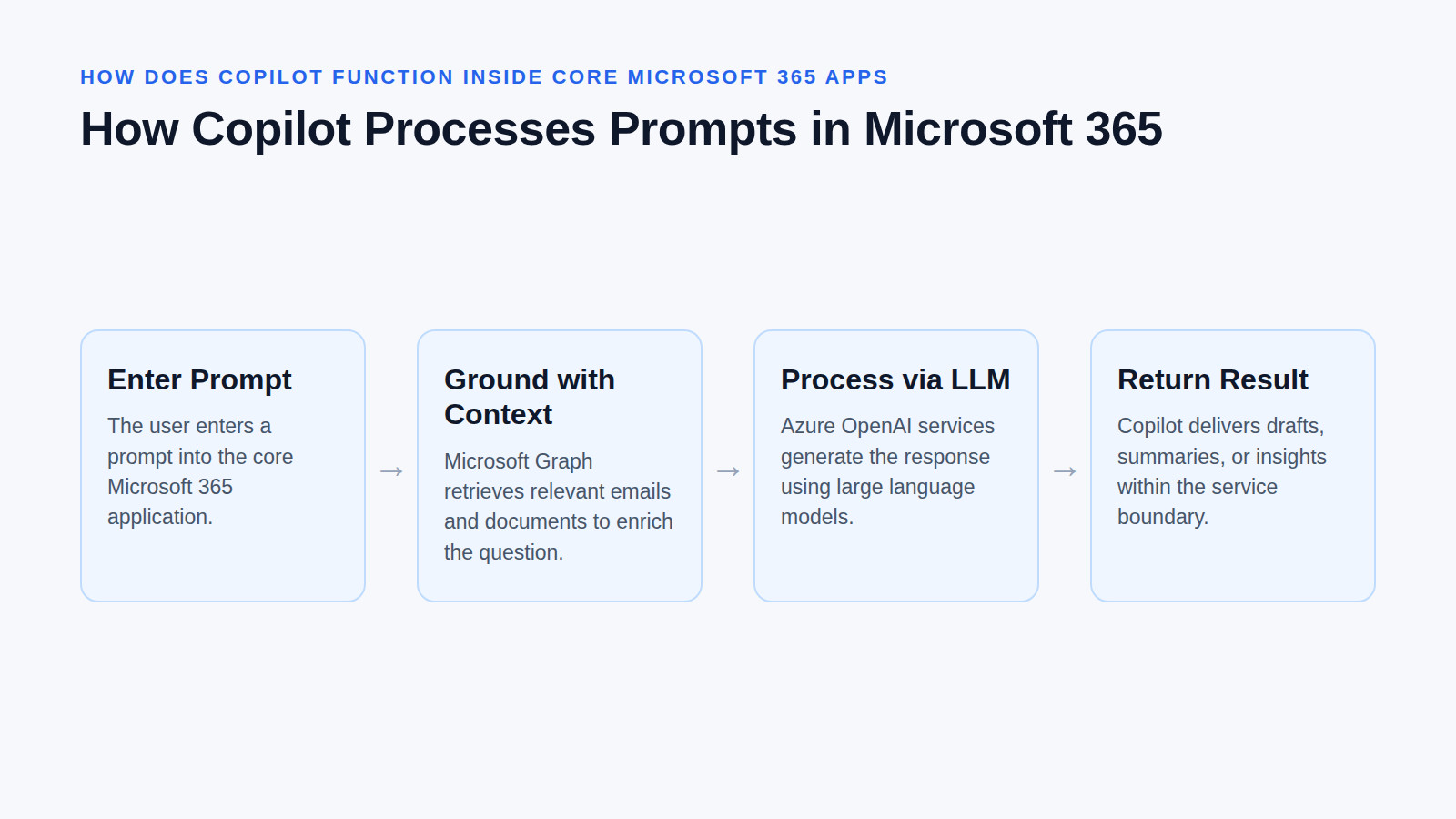
Copilot integrates directly into Word, Excel, PowerPoint, Outlook, and Teams to draft documents, analyze spreadsheet data, generate presentations, summarize email threads, and recap meetings. With the paid licence, the system draws on your organization’s internal context, using Microsoft Graph to retrieve relevant emails and documents before generating a response.
Under the hood, Copilot is an orchestration layer that connects large language models with your specific work data through Microsoft Graph and a semantic index. When you enter a prompt, the system first enriches your question with relevant context from your environment—a process called grounding—before sending it to the language model. Prompts, responses and retrieved data stay under Microsoft 365’s existing privacy and security commitments, are encrypted at rest and in transit, and aren’t used to train the underlying models, while admins decide whether third-party models such as Anthropic’s can be used.
In practice, this means Copilot can draft a Word document from a simple description or summarize a lengthy existing report. In Excel, it can identify data insights and generate charts based on natural language commands. Outlook uses the tool to manage communication overload by drafting replies and summarizing long email chains, while Teams leverages it to provide immediate meeting recaps and action items.
What Does the Evidence Say About Time Savings and ROI?
Independent research indicates a realistic return on investment of 116 percent at the enterprise scale, driven by recaptured time, faster document creation, and improved meeting efficiency, though measuring these gains requires tracking specific operational metrics rather than assuming automatic productivity boosts.
Sentry Tech Solutions highlights that a Forrester Total Economic Impact study commissioned by Microsoft demonstrated this 116 percent ROI at enterprise scale. However, the firm notes that the actual financial return is "meaningful, but not automatic". To calculate a realistic baseline, businesses should use a standard formula: hours saved per user per week multiplied by the average hourly rate, multiplied by the number of users.
Platinum Systems adds that the investment only pays off when organizations can convert that saved time into tangible business outcomes, such as faster project delivery, quicker customer responses, or reduced operational load. If the saved hours simply disappear without improving a core business metric, the licensing cost becomes a sunk expense.
Which Business Roles Gain the Most Value from Copilot?
Tech World News
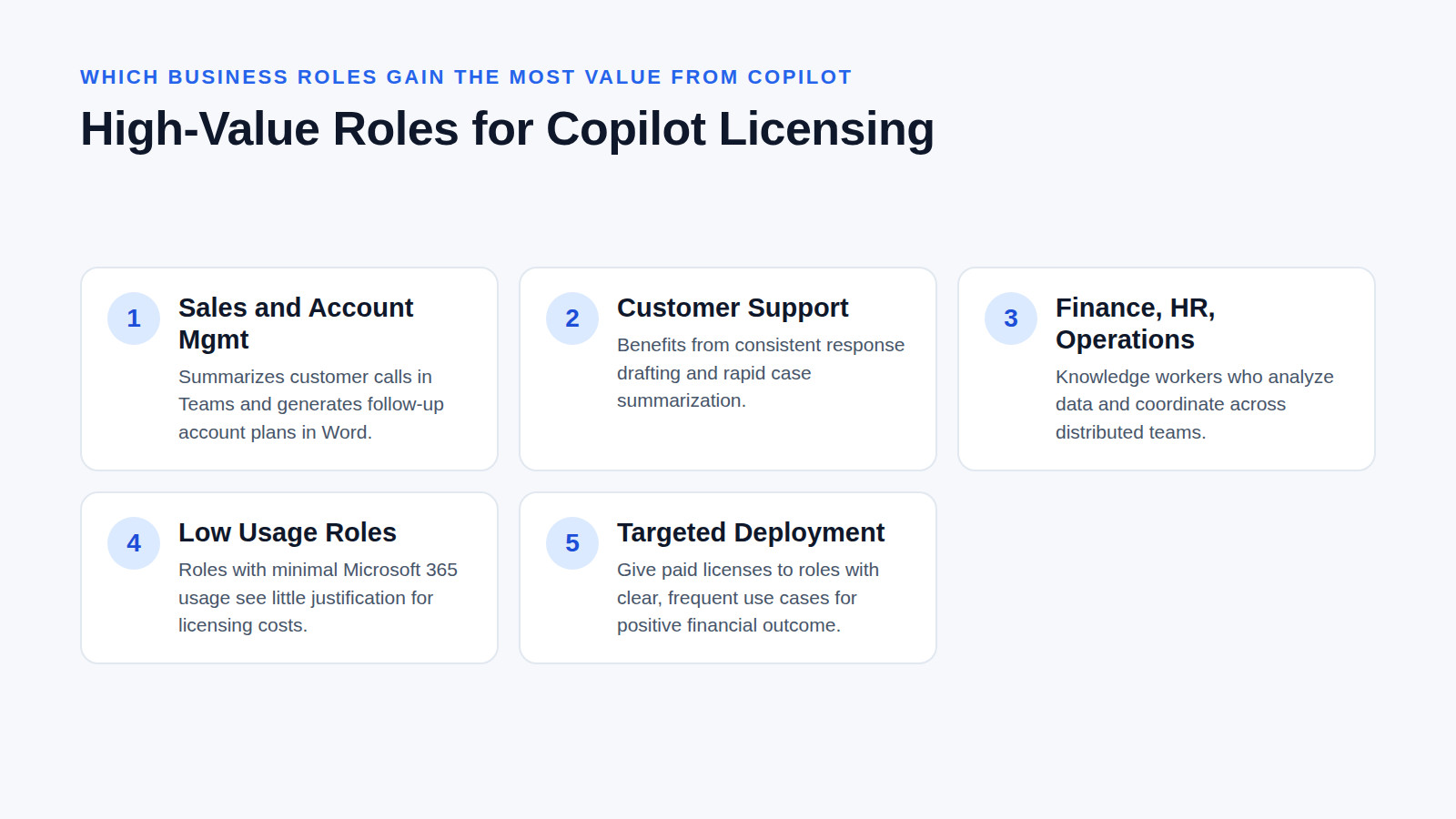
The highest value emerges for knowledge workers who spend significant time writing, summarizing, analyzing data, and coordinating across distributed teams. Conversely, roles with minimal daily Microsoft 365 usage see little justification for the recurring licensing cost, making targeted deployment essential for a positive financial outcome.
High-impact roles typically include sales and account management, customer support, finance, HR, and operations. In sales, for example, Copilot can summarize customer calls in Teams and immediately generate follow-up account plans in Word. Customer support teams benefit from consistent response drafting and rapid case summarization.
Rand Group emphasizes that the strongest business case comes from giving paid licenses to roles with clear, frequent use cases rather than assuming every employee will receive the same value. If your staff does not regularly experience information overload or rely on standardized templates for proposals and reports, the tool will not provide a sufficient return to justify the per-seat cost.
What Are the Hidden Costs and Data Governance Risks?
The primary risks involve poor data hygiene leading to misinformation, overshared SharePoint content exposing sensitive files, and the financial drain of underutilized licenses. Addressing these vulnerabilities requires strict governance, comprehensive permission audits, and a clear understanding of how the AI accesses internal tenant data.
Cloud Revolution points out that the biggest challenges organizations face are rarely the licenses themselves, but rather poor data governance, overshared SharePoint and Teams content, weak Microsoft 365 foundations and inconsistent security controls. Because Copilot operates within your existing tenant and respects current user permissions, it can surface sensitive documents in its answers if a user already has access to those files. Rencore warns of a “high misinformation risk due to poor data hygiene and broken permissions”, meaning the AI might confidently generate incorrect answers based on outdated or improperly categorized internal files.
Furthermore, Rencore notes that custom automation built in Copilot Studio can lead to unpredictable costs if not properly monitored, adding another layer of financial risk beyond the base licensing fees.
How Should Organizations Test and Roll Out Copilot?
Tech World News
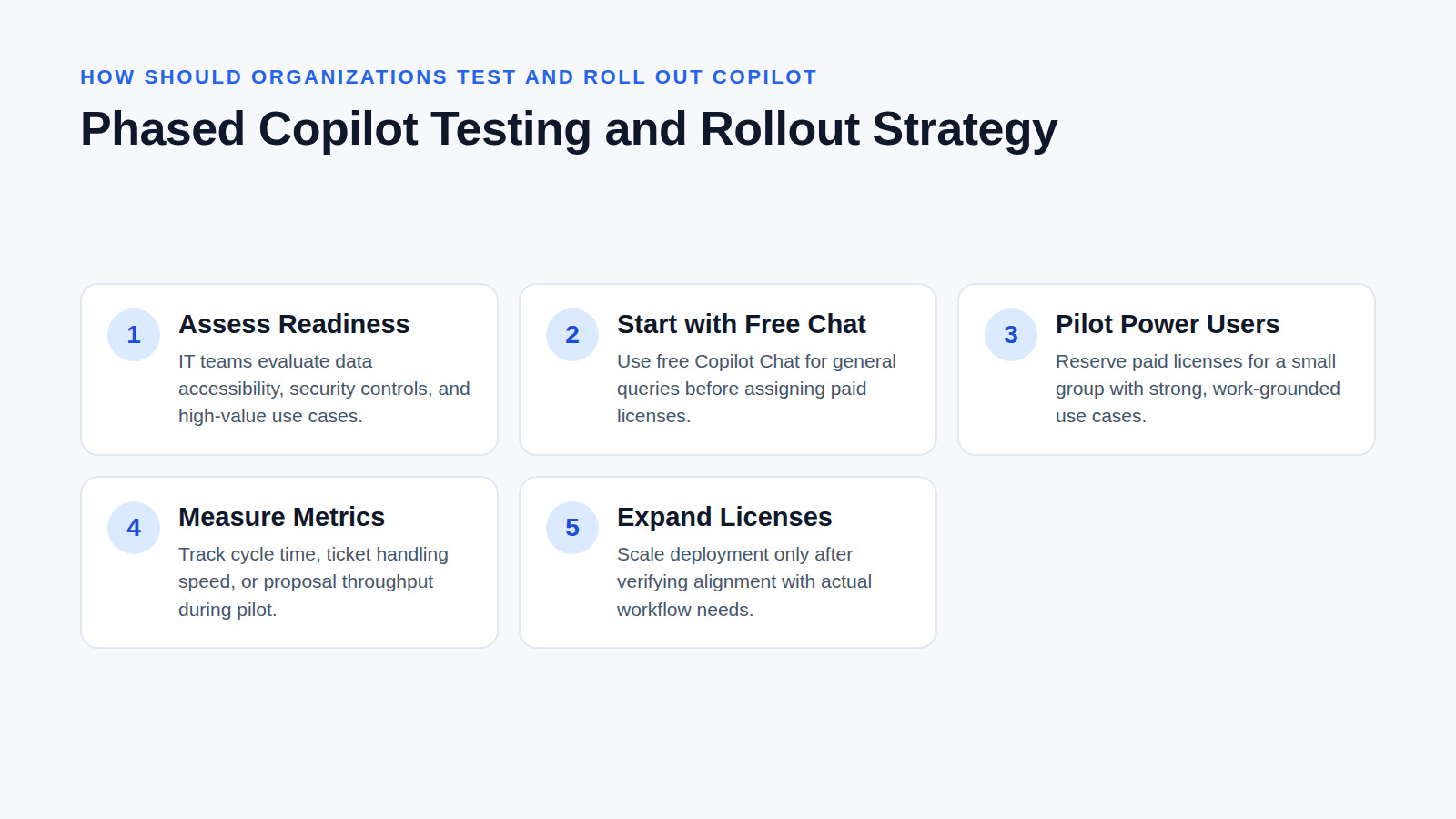
Organizations should begin with a targeted pilot group of power users, establish clear data readiness protocols, and measure specific productivity metrics before expanding licenses. This phased approach ensures the technology aligns with actual workflow needs and prevents the waste of capital on unused software.
"The organizations seeing the best results are treating Copilot as a productivity accelerator embedded within existing workflows, not as a standalone AI strategy." — Rand Group
A practical rollout begins by utilizing the free Copilot Chat for general queries while reserving the paid licenses for a small, focused group of employees with strong, work-grounded use cases. Before deployment, IT teams must conduct a thorough readiness assessment to evaluate data accessibility, security controls, and high-value use cases. During the pilot, leadership should track specific metrics like cycle time, ticket handling speed, or proposal throughput to establish a baseline before and after implementation.
What Should IT Leaders Watch For in the Next Phase of AI Adoption?
For IT decision-makers, the transition of Copilot from an experimental novelty to a standard operational expense means that AI readiness is no longer just about purchasing software; it is fundamentally about data architecture, security posture, and long-term operational planning.
As businesses move past the initial hype phase, the competitive advantage will shift from simply having access to generative AI to having cleanly structured, securely permissioned data that the AI can actually leverage. Companies that delay cleaning up their SharePoint and Teams environments will find their AI investments yielding diminishing returns compared to organizations with strict data governance. The next major differentiator will not be who buys the most licenses, but who has the cleanest internal data architecture to support them.
Practical Deployment Checklist
- Audit Permissions: Review SharePoint and Teams access to ensure sensitive data is not overshared before enabling AI features.
- Identify Power Users: Select 5 to 10 employees in high-impact roles (sales, support, operations) for the initial pilot.
- Establish Baselines: Measure current cycle times and document creation speeds to quantify future time savings.
- Review and Scale: Evaluate adoption rates and ROI after 30 days before purchasing additional licenses for the broader team.
Frequently asked questions
Do I really need Microsoft Copilot?
You only need the paid Microsoft 365 Copilot license if your employees spend significant time writing, analyzing data, and coordinating within the Microsoft ecosystem. If your team rarely uses Word, Excel, or Outlook for complex tasks, the free Copilot Chat or alternative tools may suffice. The necessity ultimately depends on whether the software will remove repeatable friction in your specific high-volume knowledge work.
Is Microsoft Copilot as good as ChatGPT?
Copilot is highly capable for deep research, document analysis, and creative writing, making it a strong value for organizations already in the Microsoft ecosystem. However, one 2026 PLOS ONE study of answers to multiple sclerosis questions ranked Gemini first and Copilot last, so test it on your own tasks rather than assuming it matches its rivals. Copilot’s primary advantage is its secure, direct integration with your private organizational data via Microsoft Graph.
What are the cons of Microsoft Copilot?
The primary cons include the high fixed licensing cost of $30 per user per month and the risk of misinformation if your internal data hygiene is poor. Additionally, organizations often struggle with slow user adoption and underutilized licenses if they fail to establish clear governance and process readiness before deployment.
Is Microsoft Copilot worth paying for?
Microsoft Copilot is worth paying for when your teams spend meaningful time inside Microsoft 365 and you can convert the saved time into faster delivery or reduced operational load. The decision comes down to whether the licensing cost is outweighed by measurable productivity improvements in your specific workflows, rather than assuming universal value across all departments.
Related articles